What Is Auracast? A Deep Dive Into Bluetooth Broadcast Audio
Auracast sends a Bluetooth LE Audio broadcast to compatible receivers. Follow the signal from the transmitter to your hearing aids, and learn what the profiles and codec do.

Auracast is a Bluetooth LE Audio feature for broadcasting sound to compatible receivers. A public venue, television, tablet, or other source can send one audio program to many listeners. A compatible hearing aid, earbud, headphone, or receiver can join that stream.
The basic idea is simple: one source broadcasts, and each listener chooses whether to receive it. The technology underneath uses a separate discovery and control process, timed radio transport, an audio codec, and profiles that describe how devices work together. This guide follows the signal from the source to the listener, then explains what compatibility and hearing benefits do and do not mean.
For examples of how Auracast fits into hearing aid features, see our hearing aid comparison. Our earlier overview of hearing aid technology changes gives more background on wireless features.
What Auracast means to a listener
Think of a museum tour, a classroom, a place of worship, an airport gate, or a television. The sound source can make an Auracast broadcast available. A compatible receiver can tune in and play that program. The source does not need to open a separate audio connection for every listener.
Auracast is not a phone app or a setting that makes every Bluetooth product compatible. It is a public broadcast configuration built on Bluetooth LE Audio. A venue must provide an active broadcast, and the listening device must support the receiver functions and configuration it uses. The Bluetooth SIG FAQ describes the feature requirements and the dependence on product support.
This changes the route sound takes. Instead of relying only on a loudspeaker and the room, the listener can receive a digital audio stream from the transmitter. That is a technical difference. It does not promise that speech will be clear in every room or for every listener.
The three roles in the system
A broadcast setup has three roles. One product can perform more than one role, but the functions remain distinct.
Role | What it does | Example |
|---|---|---|
Transmitter | Creates or receives the program audio and broadcasts it. | A television, public address system, phone, tablet, or dedicated transmitter. |
Assistant | Finds available broadcasts and helps the listener choose one. | A compatible phone, watch, hearing aid remote, or other control. |
Receiver | Joins the chosen broadcast, decodes it, and plays the sound. | A compatible hearing aid, earbud, headphone, or assistive listening receiver. |
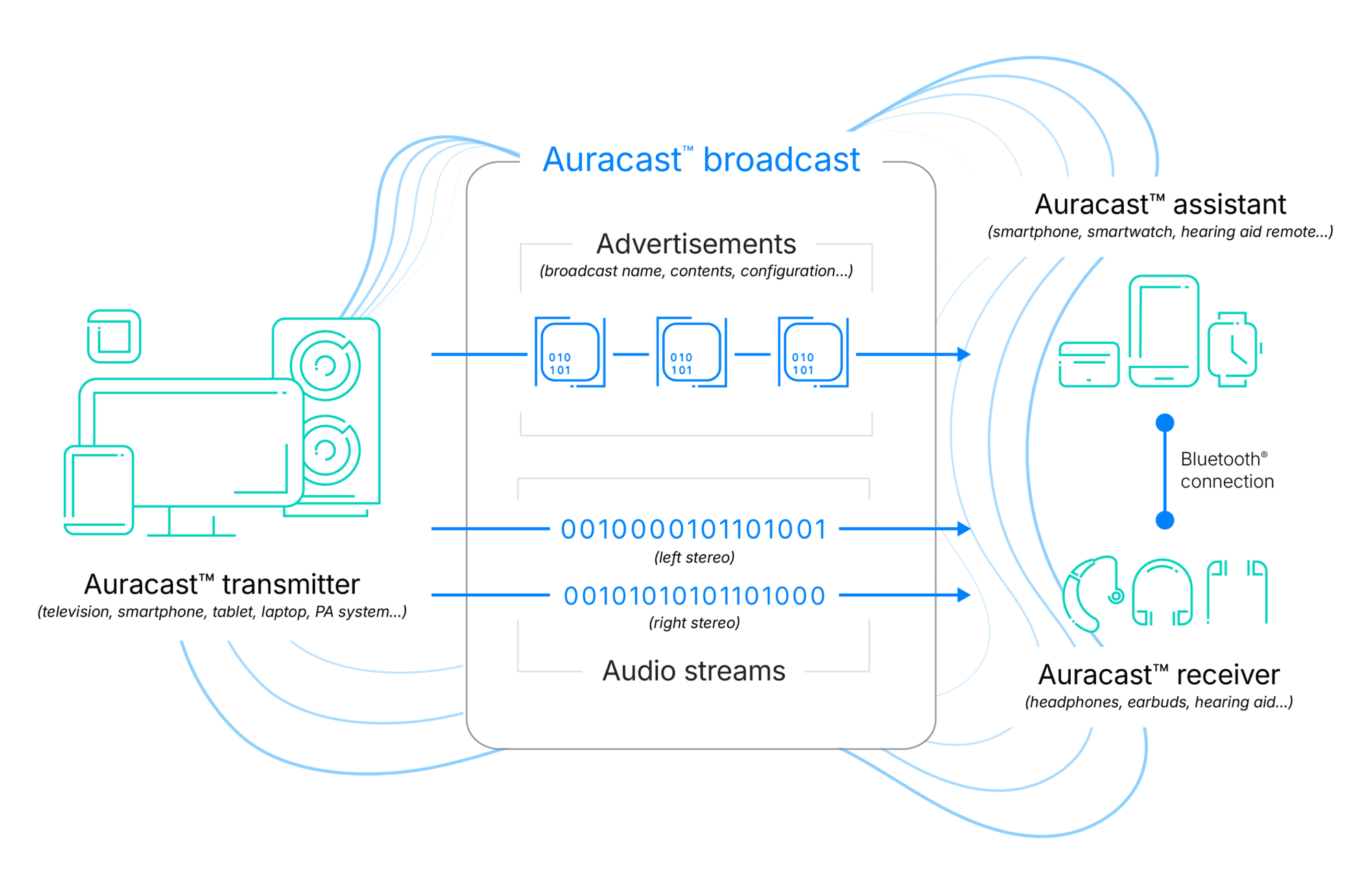
Diagram: Bluetooth SIG, “How it works.” View the original diagram.
The assistant is a control point, not a relay for the audio. It can show the broadcast name or other details, then provide the receiver with the information it needs to join. The receiver gets the audio directly from the transmitter. The phone used to find a stream does not need to stay between the transmitter and hearing aids.
Some receivers can scan and let a person choose a stream without a separate assistant. Small hearing aids may have limited buttons or screens, so a phone app or remote can make discovery easier. The control method depends on the hearing aid, phone, software, and broadcast. The Bluetooth SIG explains the assistant role in its Auracast assistant guide.
What happens when someone joins
- The transmitter advertises the broadcast. Bluetooth advertising messages tell nearby devices that a broadcast is available and may describe its name or configuration. These short messages help devices find the stream; they are not the audio itself.
- The listener chooses a stream. An assistant can scan and display available broadcasts. A venue may offer a main program, another language, or a different audio mix. The listener chooses the option that matches their needs.
- The receiver synchronizes with the stream. The assistant gives the receiver the information needed to join. The receiver then listens directly to the transmitter and turns the digital audio back into sound.
This is different from pairing two devices for a private connection. A broadcast can be available to multiple compatible receivers at once. A receiver joins the selected stream rather than asking the transmitter to create a personal audio link for that listener. Other connections may still be used for setup, remote control, or an app.
Broadcasts can be open or closed. An open broadcast is not encrypted and does not require a Broadcast_Code. A closed broadcast is encrypted and requires the correct code. A venue may use an open stream for general access or protect a stream intended for a specific group. Ask staff how the broadcast is configured before you rely on it. See the Bluetooth SIG’s LE Audio FAQs and transmitter recommendations.
The radio technology: Bluetooth LE Audio
LE means Low Energy. LE Audio carries audio over the Bluetooth Low Energy radio, with audio-specific features defined in the Bluetooth specifications. The Bluetooth SIG identifies LE Isochronous Channels, introduced in Bluetooth Core Specification 5.2, as the transport feature used for scheduled audio data.
Isochronous transport organizes data around time. Audio has to arrive in an ordered, steady sequence so the receiver can reconstruct it. Timing information helps compatible receivers stay synchronized with the stream. “Isochronous” does not mean zero delay or identical performance across products. The full audio chain, device implementation, and local radio conditions still matter.
The radio sends digital packets, not sound waves through the room. A transmitter first receives or creates a signal, encodes it, and sends data over the air. The receiver captures the packets, decodes them, and plays the result through its own speakers. Bluetooth still has a coverage area. The Bluetooth SIG says range depends on the product and environment, so a single distance cannot describe every transmitter, receiver, building, and installation.
How the codec and streams fit together
Before audio can travel as radio data, a codec encodes it into a compact digital form. Auracast uses Bluetooth LE Audio configurations that include LC3, the Low Complexity Communications Codec. The codec specification includes configurations for speech, music, and hearing aid applications.
LC3 supports 7.5 millisecond and 10 millisecond frame intervals. A frame interval describes how often the codec packages a short block of audio. A product selects from the configurations it supports. The frame interval is not an end-to-end delay measurement, a sound quality score, or a battery-life guarantee. Those results depend on more than the codec setting. The Bluetooth SIG LC3 specification lists the supported use cases and configurations.
A broadcast can contain one or more streams. Stereo audio can use separate left and right streams. A venue can also set up related streams for different languages or audio mixes. Bluetooth documentation calls an individual Broadcast Isochronous Stream a BIS. Related BIS streams can be grouped into a Broadcast Isochronous Group, or BIG. These labels describe the radio organization; listeners do not need to manage them to join a broadcast.
Multiple streams can provide useful choices, but the venue or device has to create and configure them. Auracast cannot add a translation track, improve a microphone mix, or restore sound that never reaches the transmitter.
Profiles make devices work together
A Bluetooth radio chip alone does not prove that a product can use Auracast. Profiles describe how devices use the underlying features so products can communicate in defined roles.
- Basic Audio Profile (BAP): Describes common ways devices configure, distribute, and receive LE Audio.
- Public Broadcast Profile (PBP): Defines public broadcast configurations that qualify as Auracast audio.
- Hearing Access Profile (HAP): Supports interoperability in the hearing aid ecosystem, including audio streaming and remote control functions.
The Bluetooth SIG states that Auracast depends on specific Bluetooth Core features introduced in version 5.2 and support for PBP. A version number on a box or product page is not enough to confirm that every needed role is implemented. Hardware, firmware, product style, software, and manufacturer choices also matter. Some products may receive an update, but only the manufacturer can confirm whether one is planned or available.
LE Audio includes more than public broadcast. A hearing aid may stream a phone call or music from a paired device and still lack the receiver functions needed for Auracast. A familiar Bluetooth connection therefore does not establish broadcast compatibility. For help checking a specific device, contact the manufacturer or ask your hearing care provider. Learn more about hearing aid fitting and support at Singer Audiology.
What Auracast can and cannot change
A compatible receiver can get the program audio directly from the transmitter instead of relying only on sound from a distant loudspeaker. That changes one part of the listening path. It does not guarantee better speech understanding.
The result still depends on what the transmitter receives. A poor microphone feed, competing voices near the microphone, an unsuitable volume, or the wrong stream can make the broadcast hard to use. The receiver also has to be fitted and set up for the listener. Some products mix the broadcast with nearby sound; others may replace or adjust the hearing aid microphones while streaming. Check the device instructions and controls before using the feature in an important setting.
Research on hearing in noise and reverberation shows that room sound affects speech understanding for people with and without hearing loss. One laboratory study assessed simulated acoustic scenes; it did not test Auracast. It helps explain why changing the signal path can address one factor without guaranteeing a clear result in every room. Xia and colleagues, Journal of the Acoustical Society of America.
Auracast is an audio delivery method. It is not hearing protection, a hearing test, or a treatment for hearing loss. Its usefulness depends on the activity, the available broadcast, the receiver, and the listener’s needs.
Check the exact setup before you rely on it
If you plan to use Auracast at a theater, museum, classroom, place of worship, or another venue, check these details first:
- Ask whether an Auracast broadcast is active in the specific room and for the program you plan to attend.
- Check the exact hearing aid or receiver model, style, software, and supported broadcast role with its manufacturer.
- Ask which assistant or control is required and whether you need a compatible phone, app, remote, or accessory.
- Find out how the broadcast is named and whether it is open or requires a Broadcast_Code.
- Ask whether the venue offers another assistive listening option if your device cannot join the broadcast.
If the stream does not appear, first confirm that the transmitter is on and that you are in range. If you can select the stream but cannot hear it, check whether the correct receiver is selected, whether a code is needed, and whether your software is current. A venue’s equipment and your personal devices must both support the needed functions.
For a direct compatibility and joining checklist, ask the hearing aid manufacturer about your exact model. To discuss how connectivity fits your hearing needs, request an appointment with Singer Audiology.
Sources
- Bluetooth SIG: Auracast, How it works.
- Bluetooth SIG: Auracast FAQ.
- Bluetooth SIG: LE Audio FAQs.
- Bluetooth SIG: Low Complexity Communications Codec specification.
- Bluetooth SIG: How to build an Auracast assistant.
- Bluetooth SIG: Auracast transmitter best practices.
- Bluetooth SIG: Basic Audio Profile 1.0.3.
- Bluetooth SIG: Hearing Access Profile 1.0.
- Xia J, et al. Effects of reverberation and noise on speech intelligibility in normal-hearing and aided hearing-impaired listeners. Journal of the Acoustical Society of America. 2018.